The fire door inspection app that works where the doors are
Scan the door's QR plaque, run the 41-point BS 8214:2026 checklist with guidance on every item, or the BM TRADA Q-Mark form if that's your scheme, capture photos and defects at the door, and sign off on the spot. It all works with no signal: inspections sync automatically once you're back in coverage.
Included with every DoorTRACE plan · Built in the UK for UK fire safety law · FSO 2005 · FSER 2022 · Building Safety Act 2022
iOS & Android
What a fire door inspection app does
A fire door inspection app puts the whole inspection workflow on the phone already in your pocket. Identify the door by scanning its QR plaque, answer a structured checklist item by item, photograph anything that fails, log defects with a priority and a recommended action, and sign the inspection off at the door. The record is complete the moment you walk away from it.
No paper checklist to transcribe, no photos to match up later, no report to assemble at the end of the week. The app is one half of the DoorTRACE platform: everything it captures appears live in the management portal, on the building's floor plan, and in each client's own dashboard.
Who uses it
Fire door inspectors
Survey, inspect and report from one device. The checklist, the photos and the sign-off replace the clipboard, the camera and the evening of typing up.
FM engineers
Jobs arrive on the phone with the building, floor and door already attached. Scan the plaque and the right record opens: no hunting through a spreadsheet on site.
In-house estates teams
NHS trusts, universities and councils put the app in their own operatives' hands and keep the whole inspection record in-house.
Responsible Persons
Every inspection the app captures lands in the audit trail as evidence of your Fire Safety Order 2005 duties being met, timestamped and signed.
What's in the DoorTRACE app
Everything an inspection needs on site, and nothing that belongs back at a desk. The heavier lifting: scheduling, reporting, client dashboards, lives in the portal. See how the platform fits together.
QR plaque scanning
Point the camera at the door's plaque and its full record opens: location, rating, history and the recommended next action. New doors register from the same scan.
BS 8214:2026 or BM TRADA Q-Mark
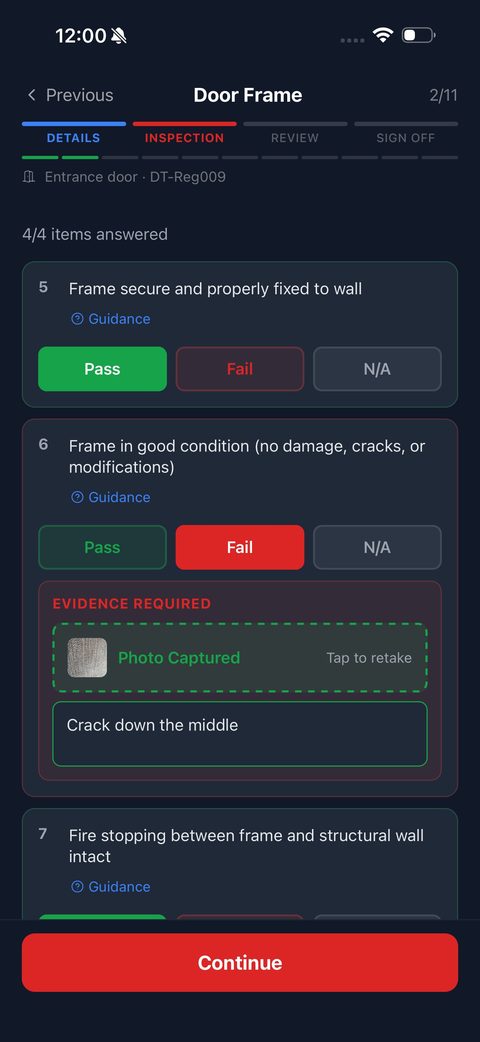
The standard inspection runs 41 items through leaf, frame, gaps, seals, closers, hinges, glazing, hardware and signage, with guidance text on every one. Engineers on the BM TRADA Q-Mark scheme switch the app to the DCS 058 form themselves, and every inspection records which scheme it was done under.
Works fully offline
Basements, stairwells and plant rooms have no signal, and that's exactly where fire doors live. Every screen of the app works offline; nothing needs a connection mid-inspection.
Photos and defects at the door
A failed item asks for evidence on the spot: photo, note, priority, recommended action. The defect is created there and then, tracked through to a signed post-remedial form.
Automatic sync
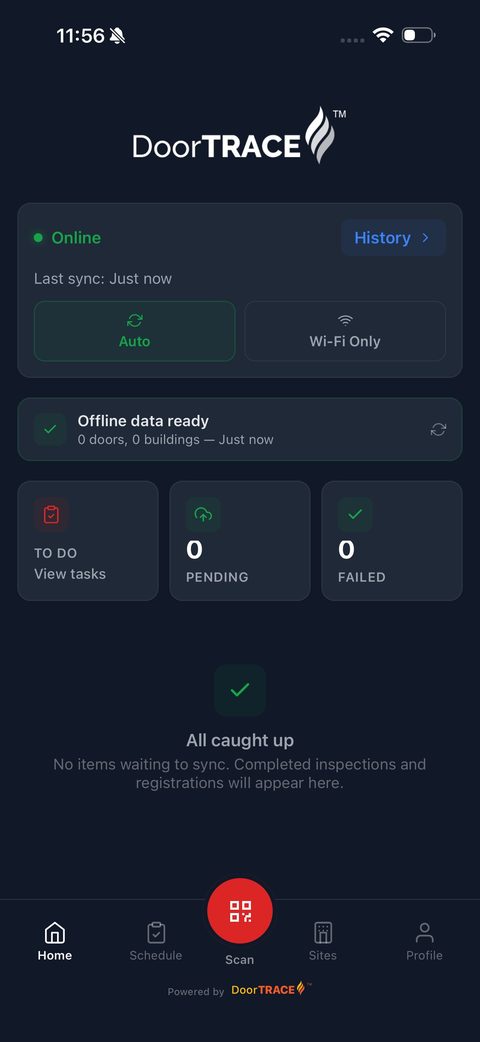
Completed inspections and photos upload themselves once you're back in coverage. A sync history shows exactly what has landed, so nothing is left stranded on a device.
Sign-off and reports
The inspection closes with a digital signature. The portal then generates the matching branded PDF, whether that's a registration certificate, an initial survey, a routine inspection or a post-remedial report, and rolls it into the door, building and client reports. Every action lands in the append-only audit trail.
The plaque is the front door to the record
Every DoorTRACE door carries a tamper-evident QR plaque. Scan it and the app shows the building, floor, location and inspection history, then recommends the right action: register a new door, run its first inspection, complete a scheduled check or sign off remedial work. No door lists to search, no wrong-door mistakes.
About QR plaques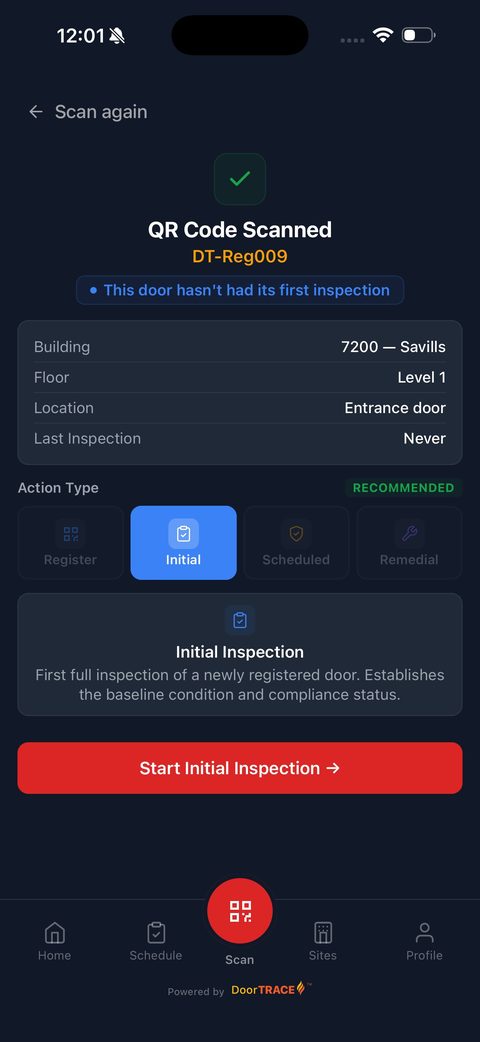
No signal is the normal case, not the edge case
The app downloads your buildings and doors before you set off, shows you exactly what's held on the device, and carries on through basements and stairwells as if nothing changed. Completed work queues up and syncs itself the moment coverage returns, with a full sync history so you can prove every inspection landed.
If an app needs connectivity mid-inspection, it fails exactly where the doors are. This one doesn't.
Runs on the phone already in your pocket
The DoorTRACE app is live on the App Store and Google Play. No dedicated hardware, no per-device licences: your engineers sign in with their DoorTRACE account and start scanning.


Free to download · Included with every DoorTRACE plan
The app comes with every plan
There's no separate app licence. Whichever way you pay for DoorTRACE, every engineer gets the app.
Everything DoorTRACE does with no contract and no minimum. Pay only for the inspections you complete; remedial work is free.
Unlimited scans, doors and users for organisations inspecting their own portfolio in-house.
A pre-agreed annual door count billed quarterly, with white-labelled client portals included.
Everything in Enterprise, and DoorTRACE performs the inspections and remedials too.
See the app on your own doors
Tell us a little about your portfolio and we'll walk one of your buildings through the app and the portal: plaques, inspection, defects and the report at the end. No obligation, no pressure.