A customer who had just surveyed about 250 doors asked us a fair question: their client wanted a copy of every inspection report, so did they really have to open each door and download them one at a time? They did not, as of now. The new Reports tab in the DoorTRACE FM portal and client portal builds every report you ask for on our servers, folders them by client, building and door, and emails you a link to one zip.
How it works
The Reports tab sits in the left menu below QR Codes. Three steps:
- Choose what to cover. All your clients or one client, then every building and door is in unless you untick it. Open a building to pick single doors. A running summary on the right shows the count.
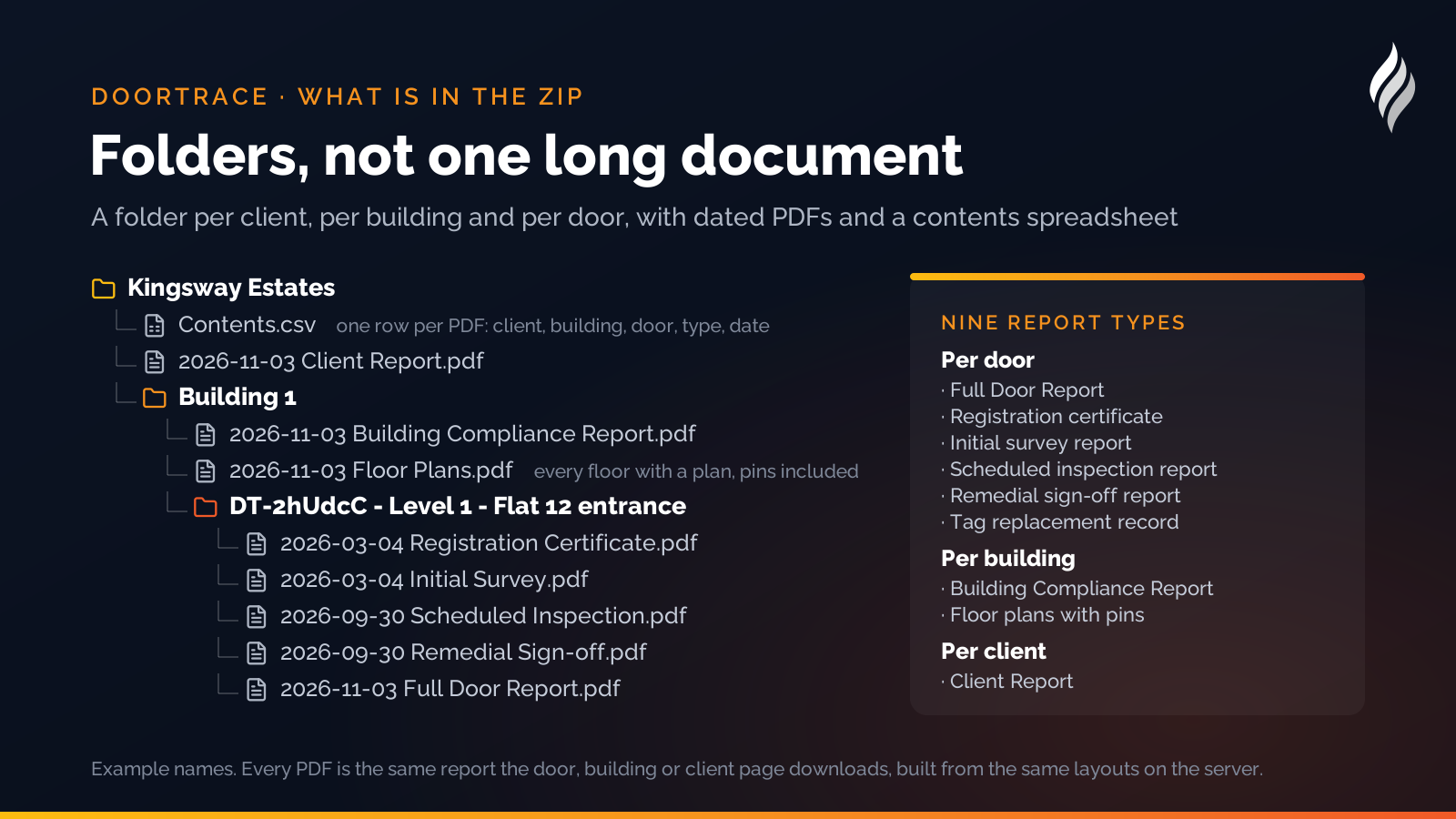
- Choose the reports. Three quick picks do most of the work: Everything on record, Latest visit per door and Summary reports only. Or pick by hand from the nine report types: the Full Door Report, registration certificates, initial survey reports, scheduled inspection reports, remedial sign-off reports and tag replacement records for each door; the Building Compliance Report and floor plans with pins for each building; and the Client Report for the client. A switch chooses all inspections, the most recent of each type, or those between two dates.
- Check and build. Name the pack, see the folder layout the zip will have and the exact number of PDFs, confirm the email address and press Build.
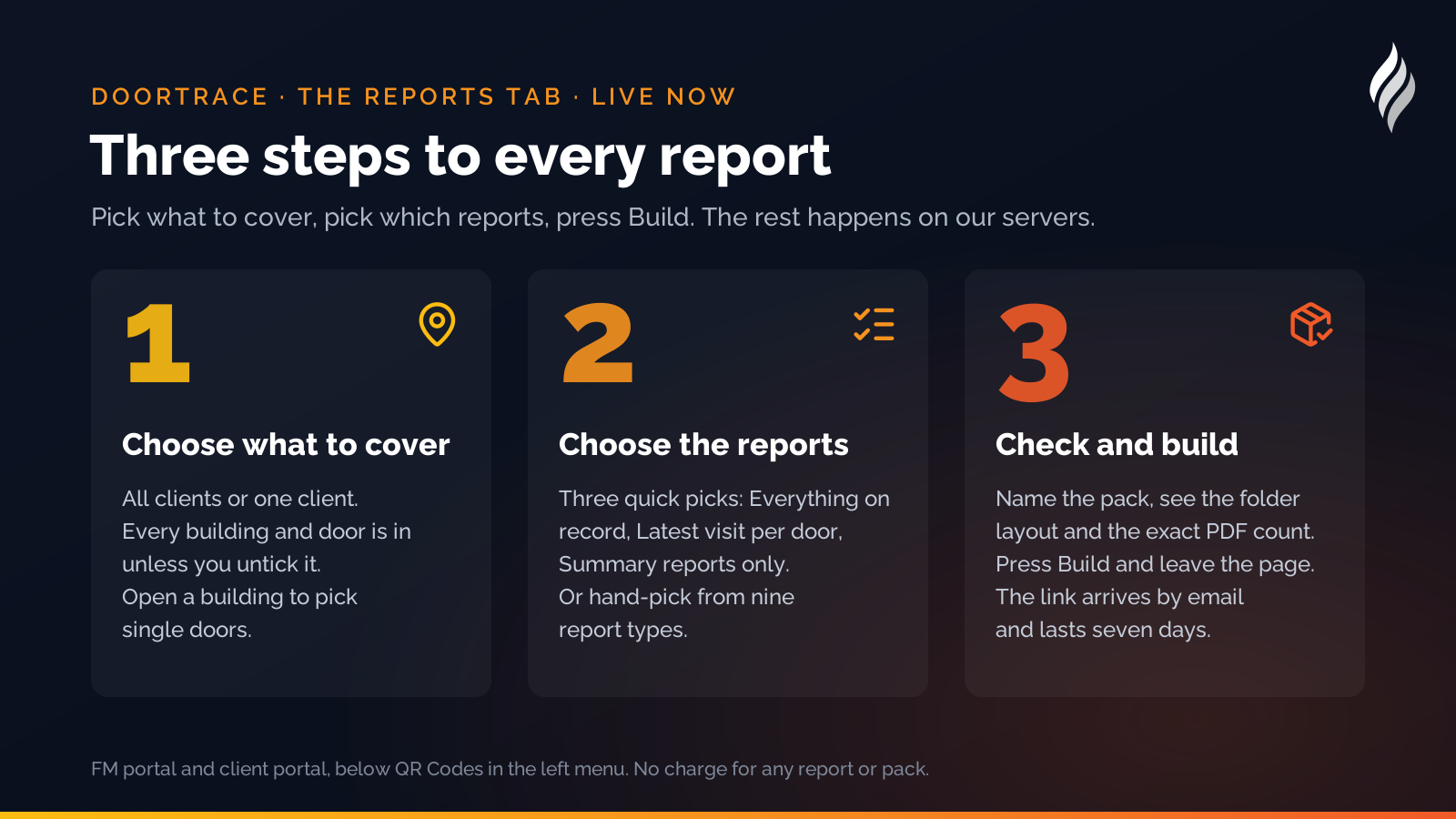
The pack is made in the background, so you can leave the page. When it is ready you get an email with the download link; the link lasts seven days, and the pack list on the tab shows progress while it is being made and lets you download, cancel or make it again.
What is in the zip
Every PDF is exactly the report you would get by downloading it from the door, building or client page, built from the same layouts on the server. The zip is folders, not one long document: a folder per client, a folder per building inside it, and a folder per door named with its DT code, floor and location, holding dated PDFs such as 2026-09-30 Initial survey.pdf. A Contents.csv at the top lists every file with its client, building, door, report type and record date, so the zip can be checked or filed without opening a single PDF.
A report that cannot be made, for example a floor plan for a building that has no plan uploaded, is listed in the email and the spreadsheet and never stops the rest of the pack.
For your clients too
The same tab is in the client portal. Your clients see their own buildings and doors, build their own packs and get their own email, with nothing extra for you to do. A client user limited to certain buildings sees only those.
Time and cost
Report packs cost nothing. There is no charge for any report in DoorTRACE, and a pack is just many of them at once. How long a pack takes depends on how many photographs its records carry, so the summary panel shows an "Allow up to" time that errs on the long side; if you need one report in a hurry, its own page is still the quickest route and takes seconds.
How DoorTRACE helps
The Reports tab is the natural end of the record DoorTRACE keeps for you: every inspection, every photograph and every sign-off on every door, available as one zip when a client, an auditor or a fire officer asks for it. See the platform, the reports it produces and the client portal, or read about fire door inspection software more generally. Existing customers will find the tab in their portal today; if you are not yet a customer, get in touch.
After the survey: building a fire door remediation plan
The survey is the easy part. A 300-door building produces a list of defects longer than anyone's budget. Here is how to turn it into a plan the board will sign, the fire officer will accept and the engineers can work from.
Building Notes: your statement on every building report
A customer surveying a heritage church needed a statement on the building report that applied to every door in it. Building Notes is the result: formatted text written once per building, printed on every report.
Fire doors in nurseries and early years settings
A nursery's occupants cannot evacuate themselves, and its doors are opened a hundred times a day by people carrying children. Here is how the Fire Safety Order applies, where the doors usually go wrong, and what to check.